

Looking for a Bluehost alternative? Maybe your site is slow, your renewal price went up, or you just want to see what else is available.
Bluehost is popular, but it’s far from your only option. I’ve narrowed it down to five Bluehost alternatives worth considering in 2026: Hostinger, SiteGround, DreamHost, WP Engine, and InMotion Hosting.
They’re all a little different. Some are better for beginners, some for WordPress, and others for larger websites.
Let’s look at what each one offers and who I think it’s best for.
The 5 Best Bluehost Alternatives
If you just want the quick answer, here’s how I’d rank them:
Hostinger – Best overall Bluehost alternative
SiteGround – Best for support and WordPress
DreamHost – Best for simple WordPress hosting
WP Engine – Best for serious WordPress websites
InMotion Hosting – Best for growing websites and businesses
Now let’s get into each one.
1. Hostinger

If I had to pick one Bluehost alternative for most people, I’d start with Hostinger.
It’s a popular choice for blogs, small business sites, portfolios, and WordPress websites. You get a good mix of price, performance, features, and ease of use without needing to be a web developer.
Hostinger includes tools for WordPress, site migration, backups, SSL, and AI-assisted website building. It also offers free site migration on its hosting plans, which makes switching from Bluehost easier.
There are plans for different types of websites, so you can start small and upgrade as your site grows.
Just keep an eye on renewal prices. Like most hosting companies, Hostinger’s introductory price can be much lower than what you’ll pay later.
Overall, if you want a Bluehost alternative that’s affordable, easy to use, and flexible, Hostinger would be my first choice.
Who Should Use Hostinger?
I’d choose Hostinger if you want:
The best overall Bluehost alternative
Affordable hosting for a blog or small website
Easy WordPress hosting
Free website migration
A beginner-friendly control panel
Hosting that can grow with your website
If you’re starting your first blog or small business website and don’t want to spend a fortune on hosting, this is where I’d look first.
2. SiteGround

SiteGround is a great Bluehost alternative, especially if you run a WordPress site and want strong support.
It offers managed WordPress hosting with free site transfers, SSL, CDN, backups, caching, and 24/7 support. There are also AI-powered tools to help manage your WordPress site.
I’d consider SiteGround if you want reliable hosting without having to deal with every technical issue yourself. Moving an existing WordPress site is also straightforward, which makes switching from Bluehost easier.
One thing to watch is the renewal price. The promotional price can be much lower than what you’ll pay after the initial term, so check the full cost before signing up.
Who Should Use SiteGround?
I’d choose SiteGround if you want:
Good WordPress hosting
Helpful customer support
Free WordPress migration
Built-in backups and security tools
Managed WordPress features
A host that is easy to use
If you’re running a WordPress blog or business website and support is important to you, SiteGround is worth a look.
3. DreamHost

DreamHost is another solid Bluehost alternative, especially for WordPress users.
It keeps things fairly simple while offering free site migrations, daily backups, NVMe storage, and 24/7 support from in-house WordPress experts.
DreamHost has also been adding AI tools, including Remixer, which can help build a website from a simple prompt.
If you’re starting a new site, these tools can be useful, but you don’t have to use them.
DreamHost also offers a 30-day money-back guarantee on its WordPress hosting plans, giving you some time to try it out.
Who Should Use DreamHost?
I’d choose DreamHost if you want:
Simple WordPress hosting
Free website migration
Daily backups
NVMe storage
24/7 WordPress support
A long-running hosting company
Helpful website-building tools
If you’re starting a WordPress blog and want something straightforward without getting lost in a huge list of options, DreamHost is a good Bluehost alternative.
4. WP Engine
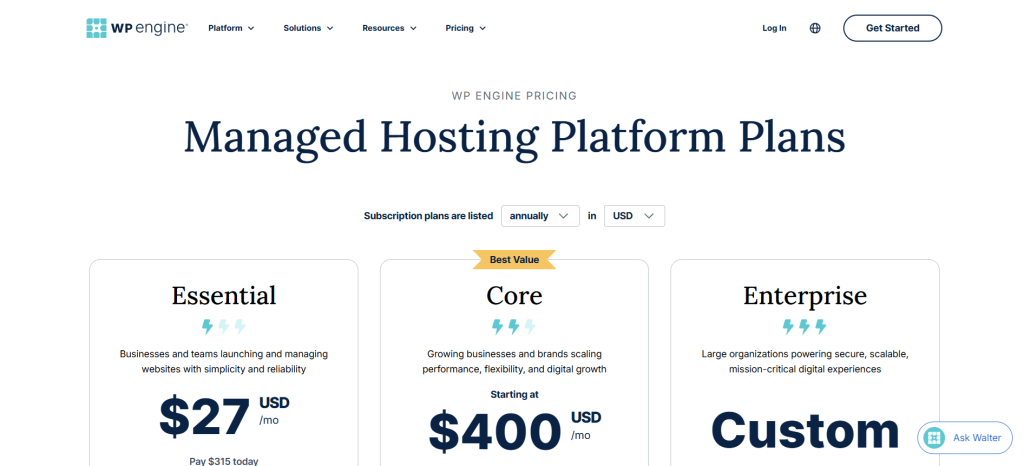
WP Engine is a different kind of Bluehost alternative.
If you’re starting a small personal blog, you probably don’t need it. But for a business website, high-traffic blog, online store, or important WordPress site, it’s worth considering.
WP Engine focuses entirely on managed WordPress hosting, handling more of the technical work for you, including performance, security, backups, updates, and support.
You also get advanced tools like staging environments, Git, SSH, and WP-CLI, along with security features such as a managed firewall and threat protection.
The downside is the price. WP Engine costs more than budget hosts, but you’re paying for a more hands-off, managed WordPress experience.
Who Should Use WP Engine?
I’d choose WP Engine if you want:
Managed WordPress hosting
Strong performance and security
Professional support
Developer tools
A hosting platform for a growing website
Less day-to-day server work
If your website makes money or is important to your business, paying more for better managed hosting can make sense.
5. InMotion Hosting

InMotion Hosting is worth considering if you’re running a business website or planning to grow.
Its WordPress hosting includes features like caching, security, backups, and WordPress-focused support.
What I like is that you can start with a simpler plan and upgrade as your site grows. You don’t have to pay for resources you don’t need right away.
That makes InMotion a good fit for small businesses, agencies, and growing websites where reliable hosting and room to scale matter.
Who Should Use InMotion Hosting?
I’d choose InMotion Hosting if you want:
Hosting for a growing website
WordPress-focused hosting
Business-friendly hosting options
More room to scale
Security and performance tools
Help when your website starts getting bigger
It’s not necessarily the host I’d tell every beginner to use, but it’s a good option if you’re already thinking about where your website will be a year or two from now.
What Should You Look for in a Bluehost Alternative?
Before switching hosts, there are a few things I’d check.
Renewal pricing: Don’t just look at the introductory price. Check what you’ll actually pay when it’s time to renew.
Migration: If you already have a Bluehost site, look for a host that offers free or easy migration.
Backups: Check how often backups run, how long they’re stored, and how easy it is to restore your site.
Performance: Your host affects website speed, which matters for both visitors and SEO.
Support: When something goes wrong, you want help quickly. Good support is worth paying a little extra for.
How Do You Move From Bluehost?
If you’re leaving Bluehost, don’t panic. Moving your site is usually easier than it sounds.
First, sign up with your new host but don’t cancel Bluehost yet. Move your website files and database, or use the new host’s migration service if it offers one.
Before changing your DNS settings, check that everything works: your pages, images, forms, login, plugins, and anything else important.
Once everything looks good, point your domain to the new host and wait for the DNS changes to take effect.
Only cancel Bluehost after you’re sure the new site is working properly.
Whatever you do, don’t cancel your old hosting too early.
Final Thoughts
Bluehost isn’t a bad choice for everyone, but it’s also not the only choice. Web hosting has changed a lot, and there are plenty of companies competing for your business now.
The important thing is not to get distracted by a huge list of features.
Think about your website, your budget, how much help you need, and where you want the site to be a year from now.
Then choose the host that makes the most sense for you.

